
You can reset the forgotten admin password via the console.
1- We connect an RJ-45 - Serial cable to the console port of the Poniva Firewall device via the console port of our computer.
2- We run putty.exe on our computer.
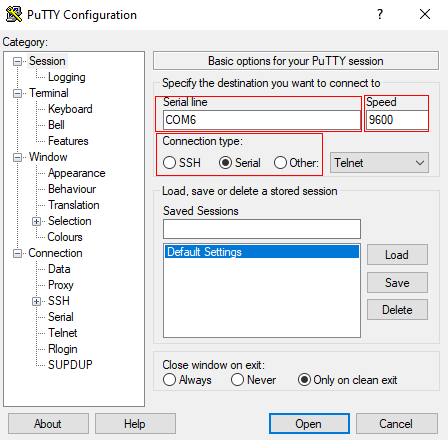
3- We make a connection using the following information.
Connection type: Serial
Serial line: COM Portu (Örneğin COM6)
Speed: 9600
4- We restart the Poniva Firewall device. If there is no power button, you can remove the adapter and reinsert it after waiting 10 seconds. (Inserting the adapter immediately after removing it may cause memory corruption in some units.)
5- Wait for the Poniva Console screen to appear.
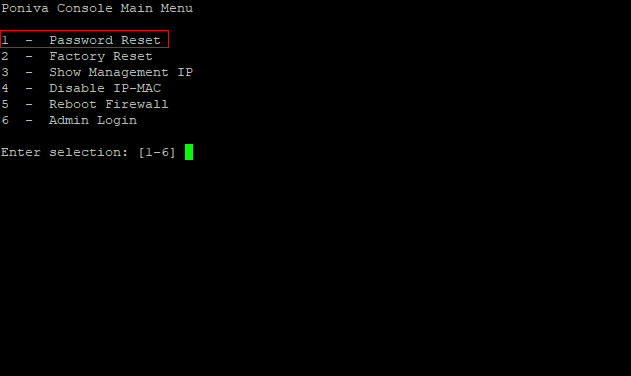
6- On the incoming screen, type 1 for Password Reset and press Enter.
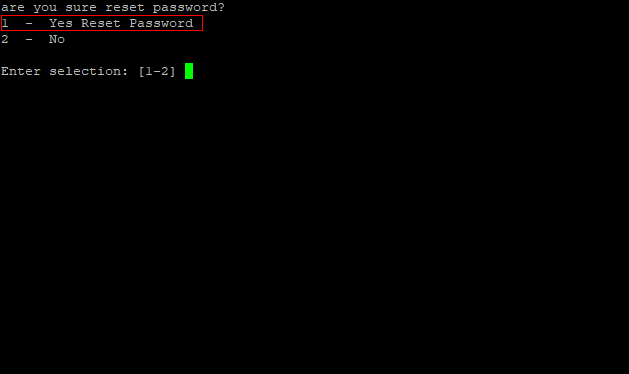
7- On the incoming screen, type 1 again for confirmation and press Enter.
8- After the password reset process is completed, the default user and password information will be displayed on the screen.
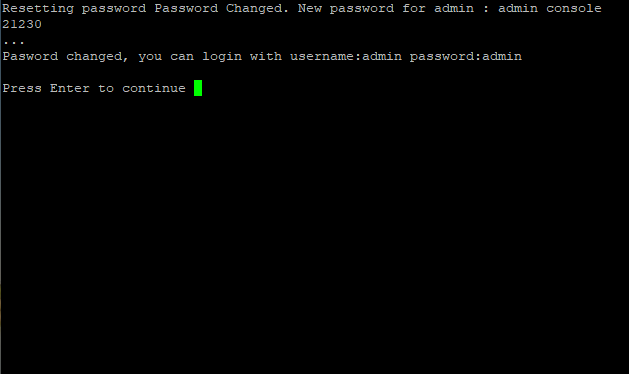
You can log in to the Interface with your new information.