
Assume that our Poniva devices in the Center-Branch locations have an IPSEC connection.
Here;
The Central Local Network is assumed to be 192.168.1.0/24.
Branch Local Network is assumed to be 192.168.2.0/24.
Branch SSL VPN Network is assumed to be 192.168.160.0/24.
At the same time, SSL VPN service is active at the branch location.
We need to define the SSL VPN network or specific IP Addresses in the Center-Branch IPSEC definitions to ensure that users who connect to the branch from outside using SSL VPN can access the center.
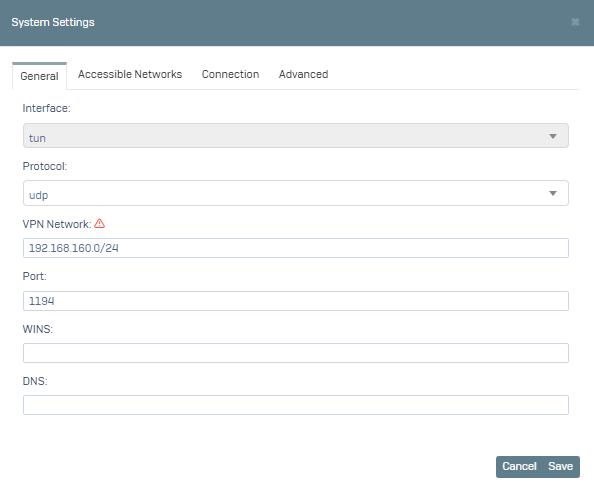
For this, click on VPN->SSL VPN->Settings menu on the Interface screen on the Branch side.
After clicking the System Settings button at the bottom, let's note the VPN Network information in the window that opens.
Then switch to the Accessible Networks tab.
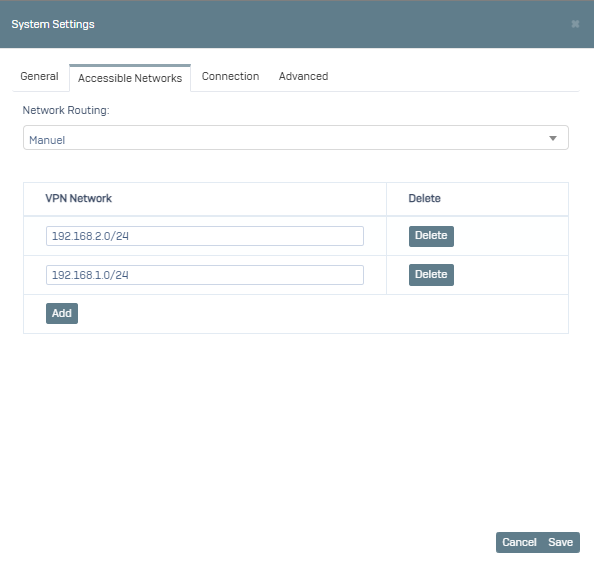
Here we manually select the Network Routing option, in the VPN Network section we specify which IPs or Networks our SSL VPN users will access. For example, you can define a single IP by saying 192.168.2.15/32 or a network definition such as 192.168.2.0/24. We want to access our local network and our central network with IPSEC VPN. We type 192.168.2.0/24 and 192.168.1.0/24.
After saying Save, click on the VPN->IPSEC menu.
Here we say edit the relevant IPSEC definition and switch to the Phase-2 tab on the screen that opens. Local Networks are your own local network. Remote Tunnel Networks are the local network on the opposite center/branch side. If you want which of your local networks to access the opposite local network, you need to add them below as shown in the image.
Since we will also include our SSL VPN network, we say add and add Local Network: 192.168.160.0/24, Remote Tunnel Network: 192.168.1.0/24.
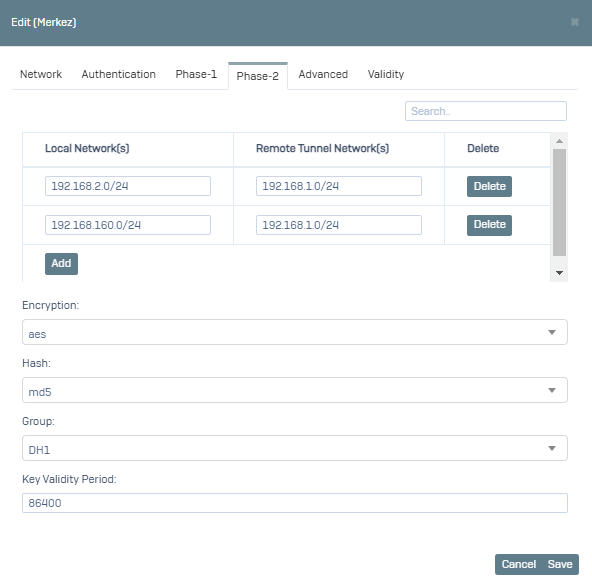
After saying Save, our operations on the Branch side are completed. Now you need to add the same process in the form of Local Network: 192.168.160.2/24, RemoteTunnel Network: 192.168.160.0/24 by coming to the relevant IPSEC VPN definition Phase-2 tab of the Central device.
Now SSL VPN users of the branch can also access the Center over IPSEC VPN.