
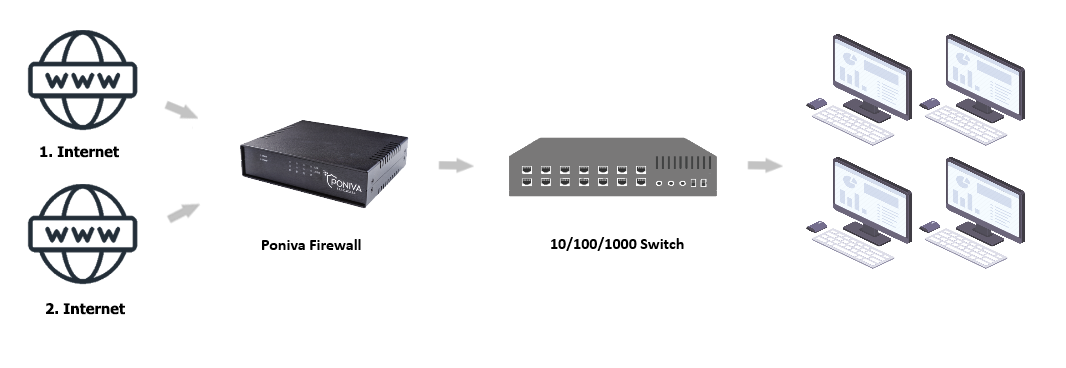
For SD-WAN configuration, at least two WAN (Internet) connections are required. With SD-WAN configuration, corporate users can access the Internet with both a WAN1 connection over Internet 1 and a WAN2 connection over Internet 2.
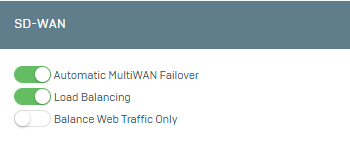
Automatic MultiWAN Failover:
When a problem occurs on WAN1 (Internet 1), users are automatically routed to the Internet via WAN2 (Internet 2). Thus, internet access within the organization continues continuously and reliably.
**After activating this feature, the interface option in your Group Management, Firewall Rules and Port Forwarding must be set to “None”. Otherwise, your rules may not work due to problems caused by line change.
Load Balancing:
With the load-balancing feature, some of the users can access the Internet using the WAN1 port and some of the users can access the Internet using the WAN2 port. This balances user traffic within the organization and ensures efficient use of resources.
Balancing Web Traffic Only:
This feature is used to balance only the activities of network traffic through web browsers. In this way, users within the organization are only subject to the balancing policies set for web traffic, other network activities are not covered by this balancing.
In the Poniva Firewall menu, go to Network->SDWAN->Settings tab.
In the tab that opens, the relevant settings can be configured.
Click the Save button at the bottom of the tab and apply.