
Hairpin NAT is a type of NAT that allows devices on the same network to access servers on their own network using external IP addresses.
This is especially necessary in cases such as web servers that need to be accessed in the same way from both the internal and external network.
For example
WAN IP: 203.0.113.1
Local Network: 192.168.1.0/24
Web Server IP Address: 192.168.1.100
Client IP Address: 192.168.1.50
is assumed.
Access from Internal Network (Hairpin NAT): The user device (192.168.1.50) on the internal network uses the IP address 203.0.113.1 to access the web server. Normally, in this case, problems can occur because the request tries to bounce back through the external IP. However, when Hairpin NAT is enabled, Poniva takes this request and redirects it back to the internal network, so that the user device can access the web server at IP address 192.168.1.100.
Access from External Network: When a user wants to access the web server over the internet, they send an HTTP request to the IP address 203.0.113.1. This request is received by Poniva and routed to IP address 192.168.1.100 thanks to NAT configuration.
This allows access to the web server from both internal and external networks with the same external IP address.
To activate Hairpin NAT, click on the Device Settings->Device Management menu on the Poniva Interface screen. On the screen that opens, click on the GENERAL SETTINGS field.
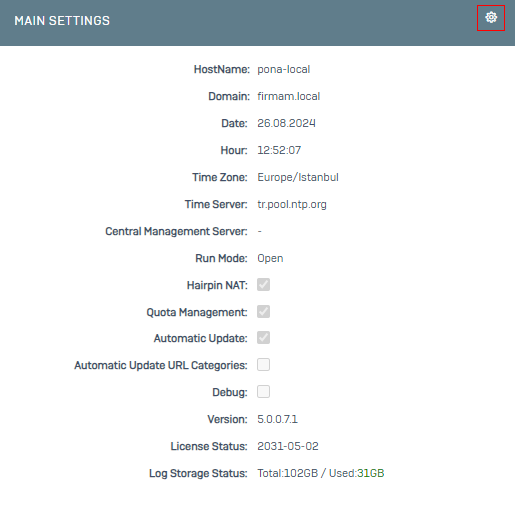
On the screen that opens, we activate the Hairpin NAT option.
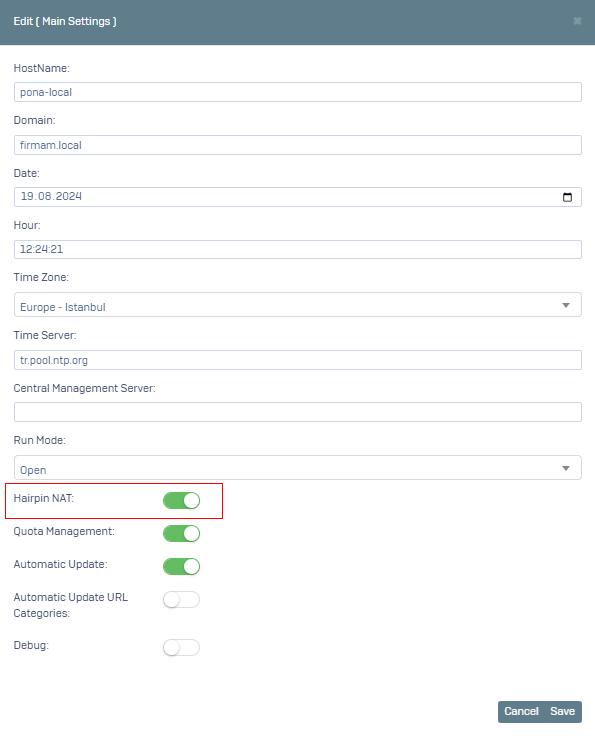
After you click Save, you can testing.